Package by Entry/Arrival Date
Report Parameters
|
Field |
Description |
|---|---|
|
Report Name |
The name of the report. |
|
Start Date |
The start date from when the data must be considered for generating the report. |
|
End Date |
The end date until when the data must be considered for generating the report. |
|
Report Options |
Available options include the following:
|
|
Building Codes |
A drop-down list consisting of all the building codes. All building records created in the Building Codes (Settings à Setup à Room à Building Codes) screen are displayed as options in the drop-down list. Users can select multiple or all the building codes from the list to be displayed in the report generated. |
Sample Report
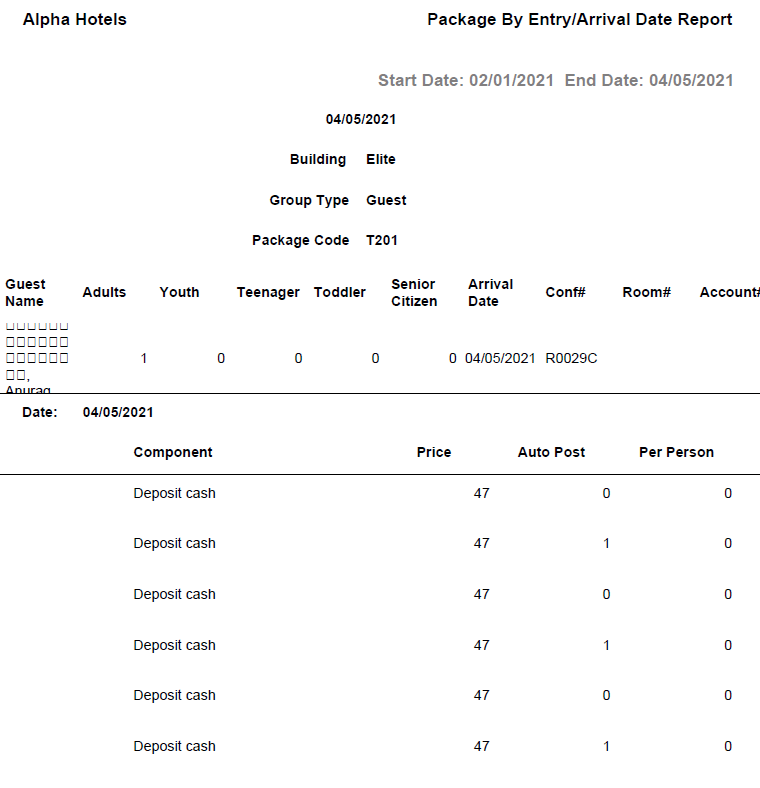
Report Fields
|
Field |
Description |
|---|---|
|
Guest name |
The last name and first name of the guest. |
|
Adults |
The number of adults on the reservation. |
|
Youth |
The number of youths on the reservation. |
|
Teenager |
The number of teenagers on the reservation. |
|
Toddler |
The number of toddler guests on the reservation. |
|
Senior Citizen |
The number of senior citizens on the reservation. |
|
Arrival Date |
The arrival date of the guest. |
|
Conf # |
The confirmation number of the reservation. |
|
Room # |
The room number of the guest. |
|
Account # |
The account number of the guest. |
|
Date |
The date the package components were added to the reservation. |
|
Component |
The package components associated with the package. |
|
Price |
The cost of package components. |
|
Auto Post |
Indicates whether the package component was posted automatically during the night audit or manually posted through an interface. |
|
Per Person |
The package breakdown per person is displayed. |